
How to Reset EzBiz Password via SSM4U: Step-by-Step Guide
Last updated: 28 September 2026
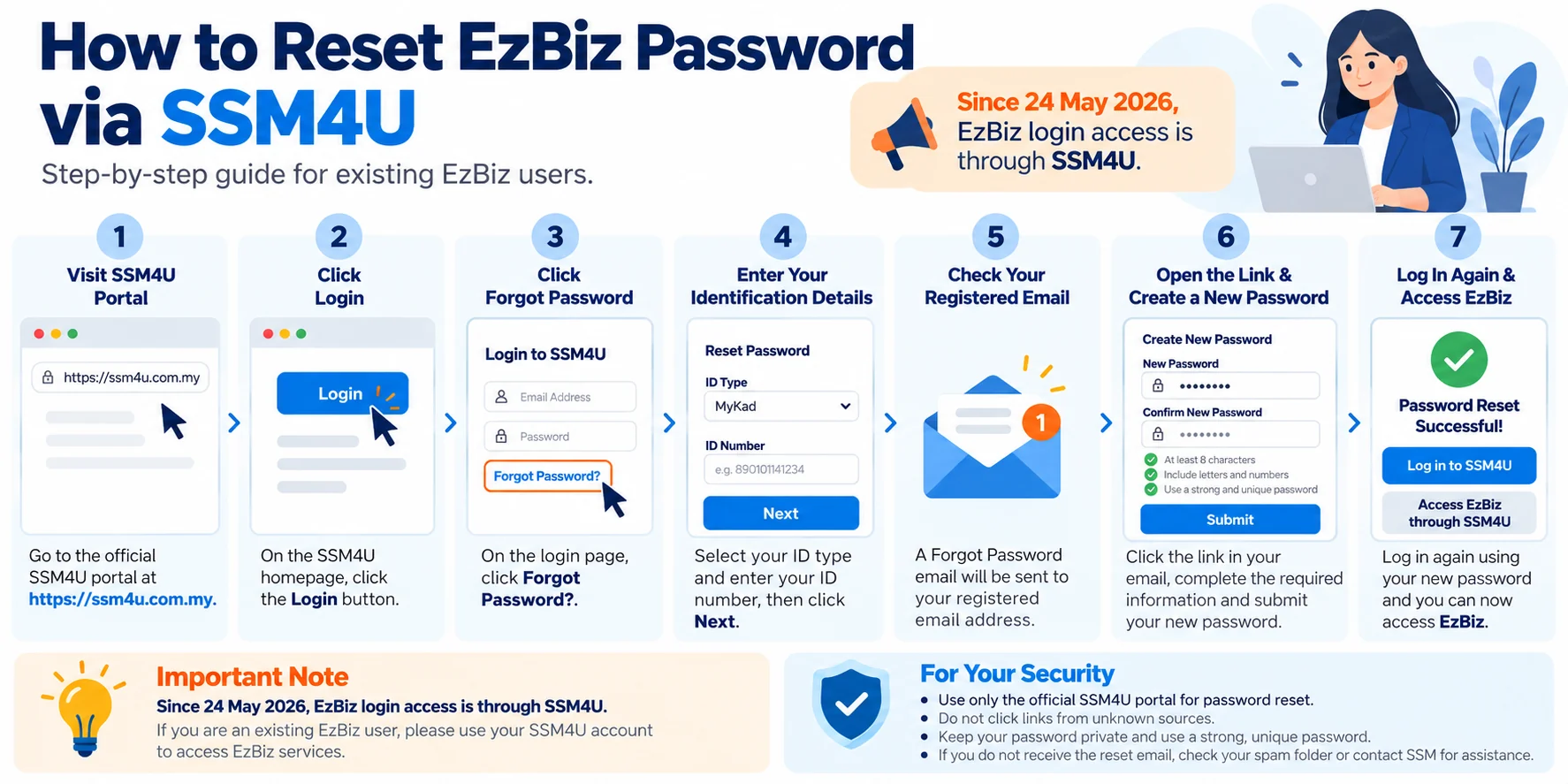
Forgot your EzBiz password? If you are searching for how to reset EzBiz, the key change is that EzBiz login access now goes through the SSM4U portal.
Quick Answer: How to Reset EzBiz
- Visit the SSM4U portal.
- Click Login.
- Select Forgot Password.
- Enter your ID Type and ID Number.
- Check your registered email address.
- Open the password-reset link sent by SSM4U.
- Enter the required information and create your new password.
- Log in to SSM4U using the new password and access EzBiz.
EzBiz Login Has Moved to SSM4U
Suruhanjaya Syarikat Malaysia (SSM) announced that all EzBiz Online login access would move to SSM4U from 24 May 2026. EzBiz remains an SSM service, but users now start from the SSM4U portal when signing in.
This matters because older EzBiz tutorials may show a standalone login screen or refer to an old username workflow. For the current reset process, follow the SSM4U password recovery steps below.
How to Reset EzBiz Password
Visit the SSM4U Portal
Open the SSM4U website at ssm4u.com.my. For security, verify the domain before entering identification details or passwords.
Click “Login”
From the SSM4U homepage, select Login. This opens the login options used to access the account-recovery function.
Select “Forgot Password”
Under the login menu, choose Forgot Password. SSM's current SSM4U user manual lists this as the starting point for password recovery.
Enter Your ID Type and ID Number
Enter the identification information requested by SSM4U. According to the current SSM guide, the reset process asks for your ID Type and ID Number.
Check Your Registered Email
SSM4U will send the Forgot Password email to the email address registered with your account. Check your inbox, spam and junk folders if the email is not immediately visible.
Open the Reset Link
Open the email and click the password-reset link. Make sure the destination is an SSM4U page before entering account information.
Create Your New Password
Complete the required information on the Forgot Password page and submit your new password. Use a unique password that is not reused for your email, banking or other business accounts.
Log In Again and Access EzBiz
Return to SSM4U and sign in with the new password. Verified users can access core services such as EzBiz through the SSM4U environment.
Forgot Your Old EzBiz Username?
The current SSM4U manual describes login using the email address and password set during registration. If you are searching for an old “EzBiz username,” you may actually need to identify the email address associated with your SSM4U account.
If you know the registered email address but forgot the password, use the Forgot Password option. If you cannot identify or access the registered email, use SSM's support channels for account assistance.
What If the Password Reset Email Does Not Arrive?
First, confirm that your ID details were entered correctly. Then check spam, junk and any company email filtering system. Search the mailbox for “SSM” or “SSM4U”. If the problem continues, contact SSM rather than repeatedly submitting reset requests.
Can You Still Use EzBiz in 2026?
Yes. SSM currently describes EzBiz as an online business registration service for new registration, changes, renewal and termination, available through the SSM4U portal. The main change is the login gateway, not the existence of EzBiz itself.
After Resetting Your Password
Once you regain access, you may want to check your registered business information or prepare for renewal. You can use our SSM e-Search page to review the relevant business information and available renewal options.
You can also return to the SSM2U homepage for other business-related services.
Frequently Asked Questions
How do I reset my EzBiz password?
Go to the SSM4U portal, click Login, choose Forgot Password, enter your ID Type and ID Number, and follow the link sent to your registered email address.
Is EzBiz now accessed through SSM4U?
Yes. SSM announced that EzBiz Online login access moved to the SSM4U portal from 24 May 2026.
Where is the EzBiz password reset email sent?
The reset email is sent to the email address registered with your SSM4U account.
Can I change my password if I can still log in?
Yes. SSM's manual states that logged-in users can click their username, choose Change Password, enter the current and new password, then submit the change.
Why can’t I access EzBiz after logging in?
SSM's current manual distinguishes between verified and unverified SSM4U users. Core services such as EzBiz are available to verified users.
Need to Check Your SSM Business?
Use our SSM e-Search page to check the relevant business information before proceeding with available renewal services.
Check SSM Business InformationPrivate service notice: ssm2u.com.my is a private service provider and is not affiliated with, sponsored by or endorsed by any government entity or SSM. For account login, password reset and SSM4U matters, use the SSM4U portal.
references: SSM announcement on the EzBiz-to-SSM4U transition; SSM4U User Manual; SSM EzBiz Online service page.